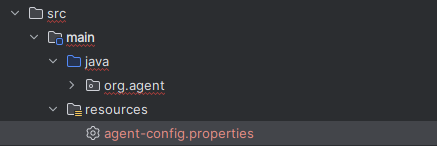
IntelliJ IDEA에서는 기본적으로 src/main/resources 폴더를 클래스패스에 포함시킨다.
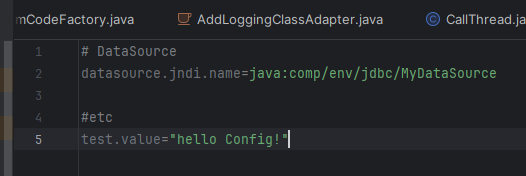
그러므로 설정 파일을 src/main/resources 폴더에 두고 클래스패스 아래에 포함시키자.
Config 읽는 예제 코드 작성
package org.agent.util.init;

import java.io.FileInputStream;
import java.io.FileNotFoundException;
import java.io.IOException;
import java.io.InputStream;
import java.util.Properties;


public class Config {
    public void loadProperties() {
        try (InputStream input = getClass().getClassLoader().getResourceAsStream("agent-config.properties")) {
            if (input == null) {
                throw new FileNotFoundException("설정 파일을 찾을 수 없음");
            }
            Properties prop = new Properties();
            // 설정 파일 로드
            prop.load(input);

            // 프로퍼티 값 읽기
            String propertyValue = prop.getProperty("test.value");
            System.out.println("Property value: " + propertyValue);
        } catch (IOException ex) {
            ex.printStackTrace();
        }
    }
}

타 서버에 심었을 시 잘 읽어오는 모습을 확인할 수 있다.
'CS study > 기타 토막지식' 카테고리의 다른 글
| Tomcat-Plain java 차이 (24.07.02) (0) | 2024.11.24 |
|---|---|
| gradle heap 초과 시 해결 방법 (Expiring Daemon because JVM heap space is exhausted) (24.05.21) (0) | 2024.10.01 |
| Record Pattern (24.05.03) (0) | 2024.09.26 |
| InteliJ lombok 인식 불가(Cannot resolve symbol 'info', Cannot Find log) (0) | 2024.04.06 |
| [트러블슈팅] InteliJ lombok 인식 불가(Cannot resolve symbol 'info', Cannot Find log) (0) | 2024.02.06 |


